Move GitHub Repository
Flowgear supports GitHub as the backing store for your Workflow designs. This document describes how to move a GitHub repository to a new organization.
Prerequisites
- Admin access on both old and new organization.
- Admin access to the repository.
Steps
-
Navigate to the GitHub repository, and open
Settings. -
At the bottom of the settings, click on Transfer under the
Transfer Ownershipsection.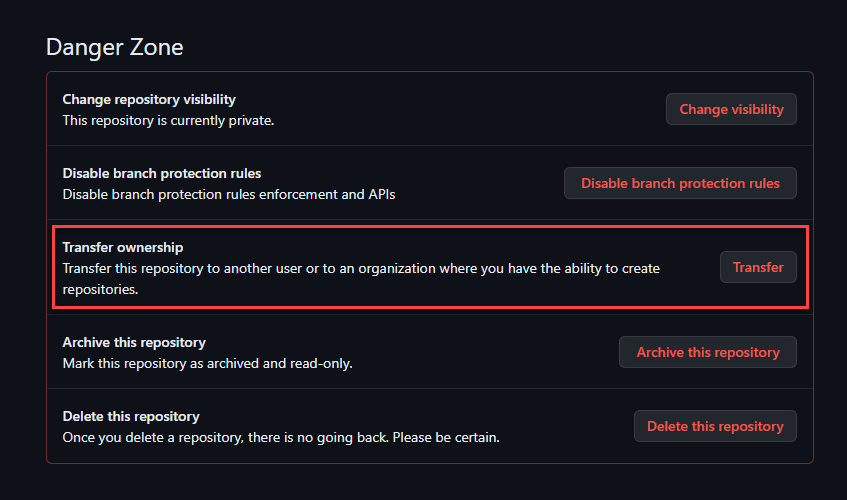
-
Select the new organization, type the repository name in the confirmation box, click
I understand, transfer this repository.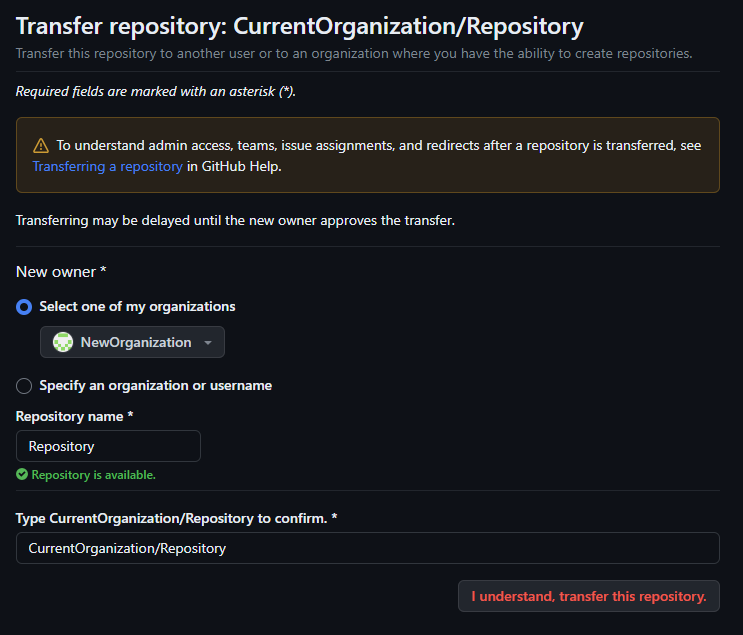
-
Update the
Repository URLunderCurrent Site→⚙️ Settings→Site Settingsin the Flowgear Console to point to the new location of the repository. -
Each user who need to edit Workflows needs to:
- Generate a new
Personal Access Tokenin GitHub. - Update the
Version Control Tokenunder→User Profilein the Flowgear Console..
- Generate a new